How to Set Up EssentialsX on Your Minecraft Server
Set up homes, warps, kits, spawn control, and basic moderation with the most popular utility plugin.
Set up homes, warps, kits, spawn control, and basic moderation with the most popular utility plugin.
EssentialsX is one of the first plugins many server owners install. It covers the basics most servers need, including /home, /warp, /spawn, kits, teleport requests, bans, and mutes. Whether you're running a survival SMP, creative server, or something in between, it's a useful starting point.
What is EssentialsX?
EssentialsX is a actively maintained plugin for current Paper and Spigot builds. It adds more than 100 commands for everyday player and admin tasks. When you pair it with LuckPerms, you can control which ranks have access to specific commands.
Requirements
- A Paper or Spigot server. EssentialsX doesn't support Vanilla or Fabric.
- LuckPerms if you want to control which players or ranks can use specific commands.
- Vault if you want to use economy features such as
/balanceand/pay.
Installation
- Go to the EssentialsX download page on SpigotMC or Modrinth and download the core
EssentialsX.jar. Extras such as EssentialsX Chat and EssentialsX Spawn are separate modules that you can add later.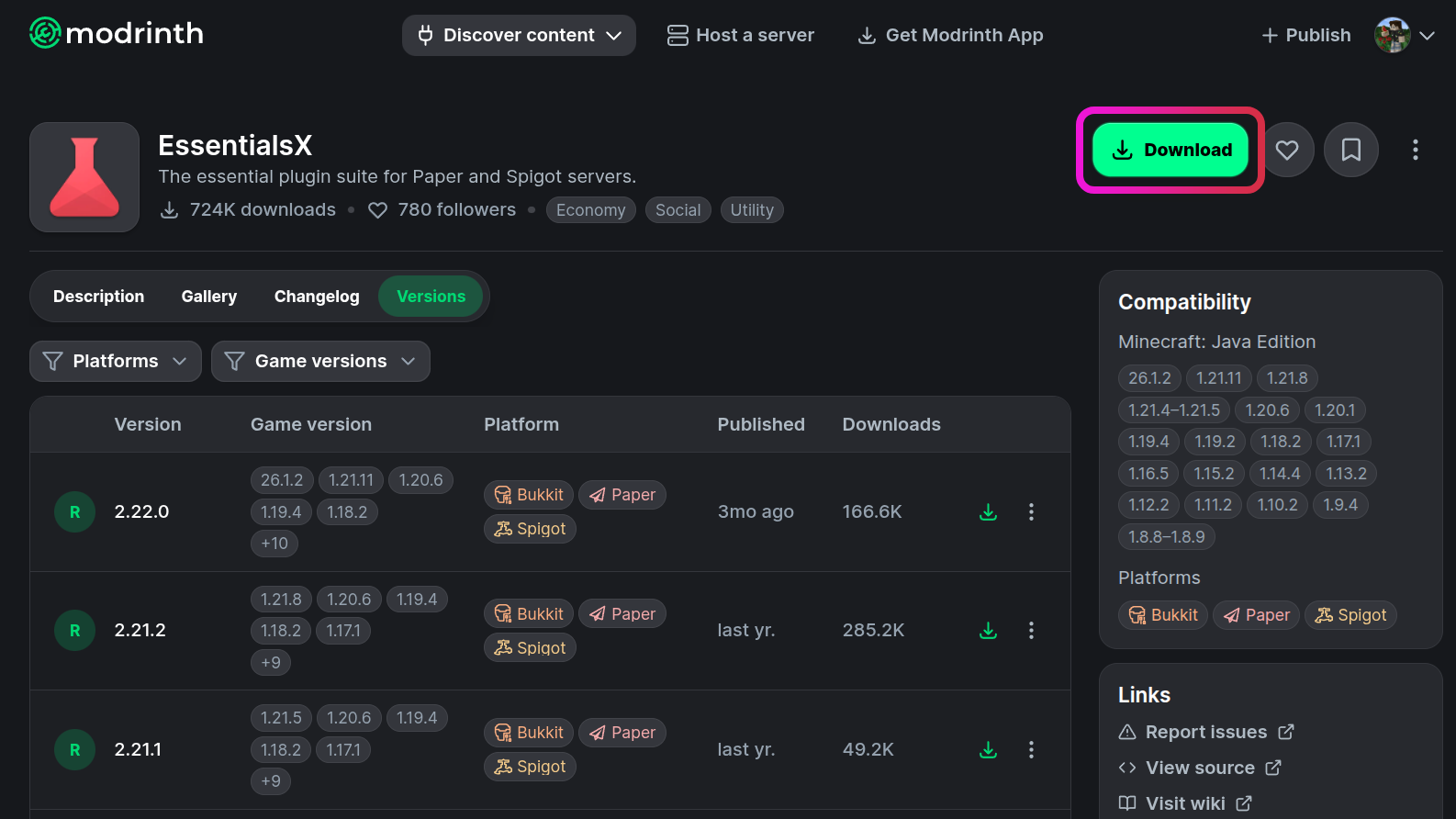
- Log in to your MCServerHost dashboard and stop your server.
- Open the File Manager, go to the
pluginsfolder, and uploadEssentialsX.jar.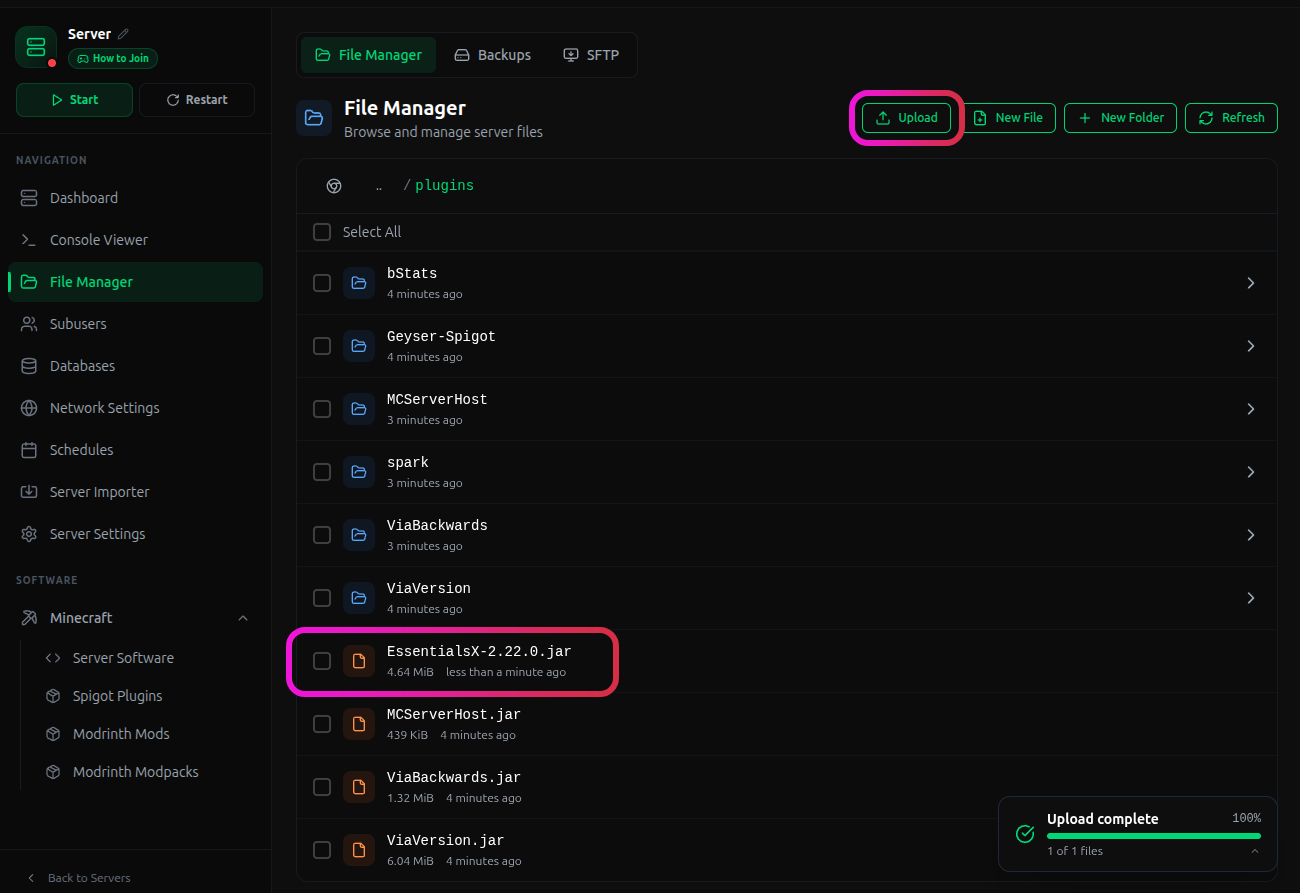
- Start your server. EssentialsX will create its config files automatically the first time it runs.
Essential Commands Reference
Admin commands:
| Command | What it does |
|---|---|
/essentials reload |
Reloads the config without restarting the server |
/ban [player] [reason] |
Permanently bans a player |
/mute [player] |
Silences a player in chat |
/vanish |
Makes you invisible to other players |
/god |
Toggles invincibility |
Player commands:
| Command | What it does |
|---|---|
/sethome [name] / /home [name] |
Saves and returns to a location |
/tpa [player] |
Sends a teleport request to another player |
/warp [name] |
Teleports to a server warp |
/kit [name] |
Claims a kit |
/msg [player] |
Sends a private message |
For the full list of commands and config options, see the EssentialsX wiki.
Controlling What Players Can Do
Each EssentialsX command has a permission node in the format essentials.[command]. Without LuckPerms, operators have access to everything while regular players get a limited default set. With LuckPerms, you can decide exactly which permissions each group gets:
/lp group default permission set essentials.home true
/lp group default permission set essentials.fly false
You can find the full list of permission nodes in the EssentialsX permissions reference.
Important Considerations
- Chat formatting isn't included in the core jar. For colored prefixes and names in chat, download EssentialsX Chat separately from the same download page and place it in the
pluginsfolder alongside the main jar. - Economy commands (
/balance,/pay,/eco) require Vault to be installed first. Without it, those commands won't work even if you've configured them. - When updating EssentialsX to a new major version, check the release notes. Config keys can change between versions, and an outdated
config.ymlmay cause commands to behave unexpectedly.
Conclusion
Installing EssentialsX early saves you from adding several separate plugins just to cover the basics. You get homes, warps, kits, spawn control, and basic moderation in one place.
If you run into issues on MCServerHost, join our Discord server or contact us at support@mcserverhost.com.
Related guides
- Which Minecraft Server Type Should You Choose? — Which Minecraft Server Type Should You Choose?
- Essential Plugins Every Minecraft Server Should Have — Essential Plugins Every Minecraft Server Should Have
- How to Change Your Server Icon — A quick and easy guide on how to upload and change your Minecraft server icon to stand out in the server list.
- How to install plugins — Plugins should be easy to install!